For StudentsParent LoginPricing

How it works · Connect Canvas

One token, one time. Read-only, encrypted.

Pearsight talks to Canvas the same way the Canvas mobile app does — via an access token you generate inside Canvas and paste into Pearsight once. Here’s the whole flow, end to end.

Generate the token

From Canvas settings, in about a minute.

In Canvas, open Account → Settings → Approved Integrations → + New Access Token. Name it “Pearsight,” leave the expiration blank for the longest-lived token, and copy what Canvas shows you.

The token only appears once — that’s a Canvas rule, not ours. Paste it into Pearsight immediately. If you lose it, regenerate; no harm done.
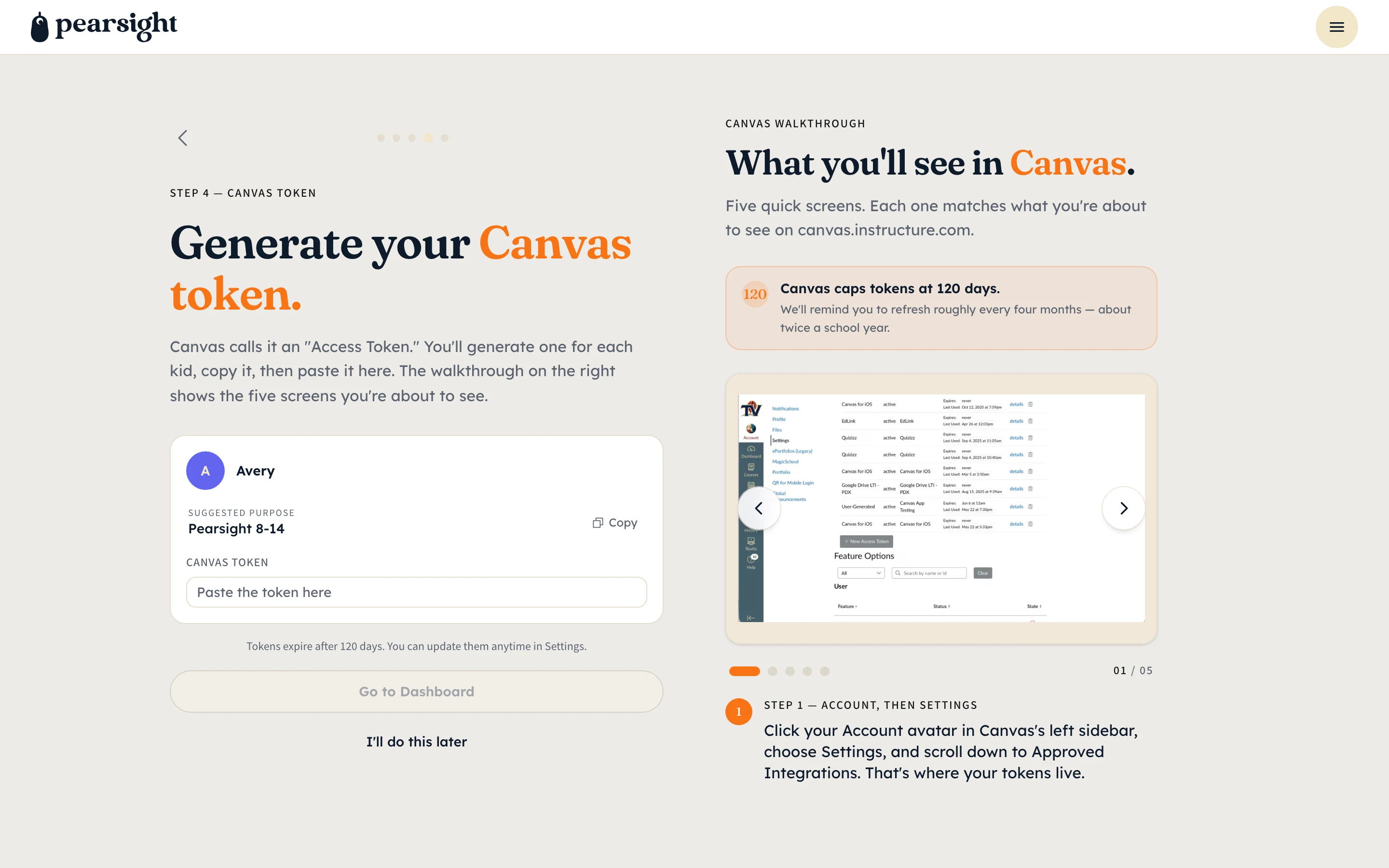
Pearsight onboarding Canvas token paste screen showing per-kid token input fields, a stepper at step four of five, and a 'How to find your token' quick-guide panel on the right.
Paste your Canvas token — one per kid.

What the token can do

Read your kid’s assignments. That’s it.

The access token Canvas issues inherits your account’s permissions — but Pearsight only uses the read-only ones. We can’t submit assignments, message teachers, change grades, or join classes on your behalf. Canvas would refuse the request if we tried.

The token is encrypted at rest with AES-256-GCM. It never appears in logs. The plain value lives in server memory only long enough to issue a single Canvas read.

Pearsight onboarding Canvas token paste screen showing per-kid token input fields, a stepper at step four of five, and a 'How to find your token' quick-guide panel on the right.
Paste your Canvas token — one per kid.

The 120-day refresh

Canvas tokens age. Pearsight handles it.

Canvas tokens have a built-in 120-day idle expiration. About a week before yours expires, Pearsight emails you to regenerate — the same one-token, one-time paste as the first setup.

If a token expires unexpectedly, the dashboard still works on the data already in Pearsight — assignments stop refreshing until you reconnect, but nothing disappears.

Pearsight onboarding Canvas token paste screen showing per-kid token input fields, a stepper at step four of five, and a 'How to find your token' quick-guide panel on the right.
Paste your Canvas token — one per kid.

More: security details · the parent dashboard · back to overview

Pearsight

The education app that keeps you and your kids on track.

Product

  • Features
  • Pricing
  • How it works
  • For parents
  • For students

Why

  • Why Pearsight
  • Why Canvas is hard
  • ADHD & school
  • Parent playbook

About

  • Connecting Canvas
  • Parent dashboard
  • Kid dashboard
  • Multiple kids

Company

  • About us
  • Security
  • Privacy
  • Terms
© 2026 Pearsight · hello@pearsight.com

Pearsight is purchased by parents on behalf of their K-12 children. The paying parent (18+) creates the family account, which constitutes verifiable parental consent under COPPA for any child under 13 the parent enrolls. Kids do not sign up directly — their access is parent-paired only. See Privacy and Security for our full data-handling stance, including FERPA-aligned controls.

Canvas is a registered trademark of Instructure, Inc. Pearsight is not affiliated with, endorsed by, or sponsored by Instructure.

Pearsight is wholly owned by Byran Newell, a sole proprietor.